Sound Amplifier
Google LLCCommunication
3.62.89K Reviews
- Version
- Varies With Device
- Installs
- 100.00M
- Age Rating
- Everyone
Screenshots
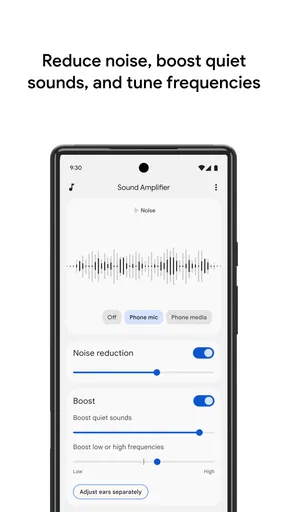
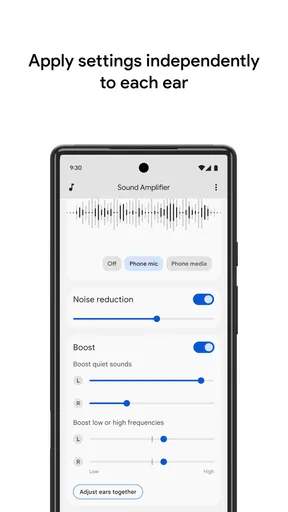
Our Review of Sound Amplifier
 Analysis by Appyee
I tend to judge a listening aid less by how impressive it sounds in a quiet room and more by whether it helps me follow a conversation without turning setup into a project. Sound Amplifier is a free communication app from Google LLC, aimed at making nearby sound easier to hear through headphones. Its appeal is practical: it gives you a way to adjust what reaches your ears rather than simply raising the volume of your phone speaker. That can be useful in an ordinary, noisy day, though it is not a substitute for hearing care or a dedicated hearing device.
What to expect when you start listening
The basic idea is easy to understand: connect headphones, open the app, and listen to sound coming from around you. The first useful test is not a dramatic one. I would try it at home with a familiar voice, then make small adjustments and notice whether speech becomes easier to follow without making the room sound harsh. That gives you a sensible starting point before relying on it in a busy place.
Speed expectations should stay realistic. Sound processing is meant to help while you listen, not to repair a recording or make every distant voice perfectly clear. In a calm room, the change may feel modest; in a place with competing sounds, even a modest improvement in speech focus can matter. I would avoid treating the first setting that sounds louder as automatically better. A comfortable level you can listen to for a while is more useful than maximum amplification.
A useful routine for noisy moments
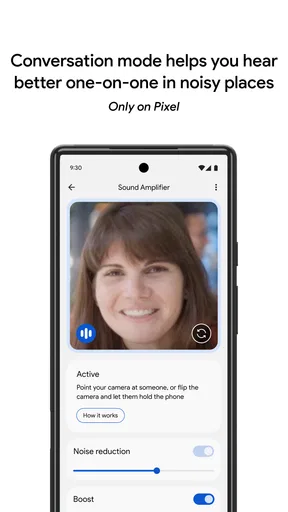
A café is a good example of where I would try it: sit facing the person speaking, put on your headphones, and adjust the balance while they talk. The app may make conversation easier to attend to, but it cannot guarantee that every voice will stand out from clatter, music, or several people speaking at once. Choosing a seat away from a coffee grinder or facing your conversation partner can still do more than repeatedly turning up the sound.
That combination of app and ordinary listening habits is one of its less obvious strengths. Rather than asking the software to overcome the entire room, I would use it to make a better listening position work better. At a family gathering, for example, stepping a little away from the television or kitchen noise can give the app less competing sound to deal with. The trade-off is that this is still a live listening setup: you need to have your phone and headphones with you, and you may want to adjust things as the setting changes.
It also suits a quiet evening when someone else is asleep and you want to follow television dialogue through headphones instead of raising the room volume. I would check that the phone and headphones are connected and comfortable before settling in, then adjust cautiously. A sound that seems clear for a short clip can become tiring over a longer programme, especially if background effects are also prominent.
Getting Started with Sound Amplifier
First things first, installing Sound Amplifier is a breeze. Pop over to your app store, hit download, and you're ready to roll. Once you open it, the app greets you with a straightforward interface that even my grandma could navigate. I love that it doesn’t bombard you with a million options from the get-go. Instead, it's all about ease of use.
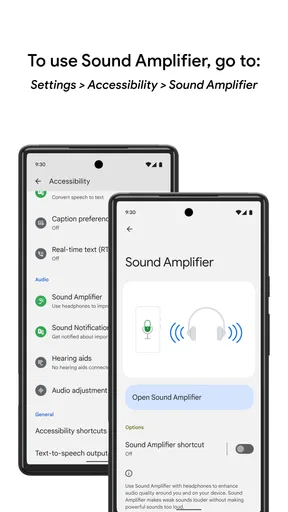
Setting it up is as simple as plugging in your headphones. Yep, that’s all it takes! The app automatically starts enhancing the sounds around you. It’s like putting on a pair of glasses but for your ears—everything just becomes clearer.
Features That Stand Out
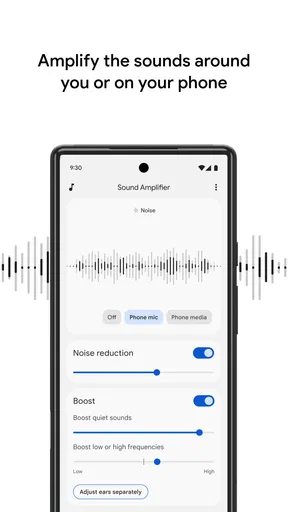
Now, let's dive into what makes this app tick. One of the coolest features is the ability to customize sound settings to suit your specific needs. Whether you want to emphasize vocals or filter out background noise, it’s all just a tap away. You can adjust these settings in real-time, which is super handy for those on-the-go adjustments.
Another feature that deserves a shoutout is its compatibility with Bluetooth headphones. This means you can wander around freely without being tethered to your device, which is a huge plus for anyone who dislikes being tied down by wires.
Oh, and did I mention the sound visualization? It’s like having a mini equalizer on your screen! You can see exactly which frequencies are being amplified, giving you a visual representation of the magic happening in your ears.
Using the App in Real Life
I took Sound Amplifier for a test drive in a few different scenarios. At a busy coffee shop, it worked wonders. The app easily filtered out the background chatter, allowing me to focus on my friend’s conversation without constantly asking, “What was that?”
Next, I tried it while watching TV late at night. I didn’t want to crank up the volume and wake up the whole house. Instead, I used the app to enhance the dialogue and it worked like a charm. The words were crisp and clear, all without disturbing anyone else.
Keeping the experience comfortable
A practical tip is to make one adjustment at a time. If you change several sound controls together, it becomes difficult to tell which change actually helped. I would start with the setting that makes speech easier to pick out, listen for a minute, and then fine-tune only if needed. This is especially helpful when moving from a quiet room to a shop or street, where the sound mix changes and yesterday’s preferred setup may no longer feel comfortable.
Bluetooth offers freedom from a cable, but it also adds another connection to keep in mind. If audio seems delayed, interrupted, or absent, I would first check that the headphones are still connected and that the app is using the intended listening setup. Wired headphones can be a simpler choice when reliability matters more than moving around, while Bluetooth is more convenient when you need to keep your phone in a pocket or bag.
Where it fits among listening options
Compared with simply raising the phone’s media volume, the app is useful because it is intended to alter the sound you are listening to, not just make every part of a programme louder. That distinction matters when speech is hard to follow but background sound is already intrusive. At the same time, ordinary headphones and a volume slider may be enough for someone who only wants louder music or video playback. This app makes more sense when the goal is to listen to nearby sound and shape it, rather than boost entertainment audio alone.
It is also different from asking someone to repeat themselves or moving closer: those options require no setup and can be more effective in a specific conversation, but they are not always convenient or socially comfortable. I would treat the app as another tool in that mix, not a reason to stop choosing a quieter seat, facing the speaker, or asking for clearer speech. If you need a dependable hearing solution throughout the day, a professional assessment or purpose-built hearing equipment is a more appropriate route than relying on a phone app alone.
Stability, battery habits, and device limits
For a short listening session, the workflow is straightforward; for extended use, the phone becomes part of the listening chain. You need it nearby, and the headphones need to stay connected and comfortable. That is a real constraint if you want to move around freely, dislike wearing headphones for long periods, or need to keep your hands and ears available to notice other people and sounds around you. I would be cautious using any amplified listening setup in situations where awareness of the environment is important.
Heavy-use moments are where small inconveniences become more noticeable. A long visit, a noisy commute, or a day of switching between conversations can mean repeated adjustments and more time wearing headphones. I would check comfort and listening level before a long session rather than waiting until the sound feels tiring. Phone and headphone battery life also matter in practical terms, even though the app itself cannot solve a depleted device. Keeping a familiar backup—such as moving closer or choosing a quieter spot—means you are not dependent on the setup working every moment.
If the sound stops behaving as expected, I would recover in a simple order: pause, check the headphone connection, confirm that the phone is still positioned for the kind of sound you want to hear, and then reopen or restart the listening session if necessary. That is not a guarantee against every interruption, but it avoids changing multiple settings blindly. I would also test the setup before an important conversation rather than discovering a connection problem midway through it.
Who will get the most from it
I can see this being most helpful for someone who wants occasional support following speech in a familiar setting and is comfortable using headphones with a phone. It may also suit people who want to experiment with sound adjustments before deciding whether a different listening approach would work better. Google LLC’s app is free, rated for Everyone, and has an average rating of 3.6 from around 91,000 ratings, with more than 100 million installs. Those figures show that it has reached a broad audience, but they do not mean it will suit every person or every hearing need.
I would suggest skipping it if you need a standalone device, dislike headphones, want a tool that works without keeping a phone close, or expect it to remove all background noise in a crowded room. It is also not the right choice for diagnosing hearing changes or replacing advice from a hearing professional. Its best role is narrower and more practical: give a person a way to adjust nearby listening when the phone-and-headphone arrangement fits the situation.
Final Thoughts
Overall, Sound Amplifier is a brilliant tool for anyone who needs a little extra help hearing the world around them. It’s perfect for those with mild hearing difficulties or just about anyone who loves their audio crisp and clear.
It’s not just about amplifying sound; it’s about enhancing your entire listening experience. With its intuitive design, customizable settings, and top-notch performance, it’s definitely worth checking out. So, grab your headphones and give it a try. You might just find that it changes the way you listen to the world!
My performance verdict
My overall view is that this is a focused, approachable listening aid rather than an all-purpose audio fix. The simple setup and immediate adjustments are its strongest practical qualities; the main compromises are dependence on a phone and headphones, the need to adapt settings to each environment, and the fact that noise and distance still matter. I would recommend trying it in a low-pressure situation first, then deciding whether it genuinely makes conversation easier for you. If it does, it can be a handy everyday option; if the improvement is limited or listening remains tiring, a different device or professional guidance is the better next step.
Verdict
Strengths of Sound Amplifier
- Enhances audio clarity significantly.
- Customizable sound settings for users.
- Works well with most headphones.
- Easy to navigate user interface.
- Minimal battery consumption.
Limitations of Sound Amplifier
- Limited language support options.
- Requires Android 6.0 or higher.
- Some features need internet.
- Limited support for Bluetooth devices.
- Can lag on older devices.
Other Releases by Google LLC
View All
Google Calendar
Productivity4.6

Google Messages
Communication4.6

Tools4.0

Google TV
Video Players & Editors3.9
Similar Picks in This Category
View AllGoogle Messages
Google LLC4.6

Gmail
Google LLC4.1

Google Meet
Google LLC4.4

Google Chrome
Google LLC4.1

WhatsApp Messenger
WhatsApp LLC4.6

Carrier Services
Google LLC4.2
Frequently Asked Questions
What is Sound Amplifier and how does it work?
Sound Amplifier is an app designed to enhance audio on your device, making it easier to hear conversations, media, and environmental sounds. It works by using your device's microphone to pick up sounds and then amplifying them through your headphones. The app allows you to adjust settings to filter out background noise and improve clarity.
Is Sound Amplifier compatible with all headphones and devices?
Sound Amplifier is compatible with most Android devices running version 6.0 (Marshmallow) or higher. It works best with wired or Bluetooth headphones. However, the performance might vary depending on the quality of your headphones and the specific hardware of your device. Always check the app's compatibility list for updates.
Can I use Sound Amplifier to enhance music and media audio?
Yes, while Sound Amplifier is primarily designed to improve speech clarity, it can also be used to enhance music and other media audio on your device. You can adjust the bass, treble, and other audio settings to better suit your listening preferences, making it a versatile tool for various audio needs.
Does Sound Amplifier work offline, and does it consume a lot of battery?
Sound Amplifier can work offline as it processes sounds locally on your device. However, using the app continuously may lead to increased battery consumption due to the real-time audio processing. It's advisable to monitor your battery usage and adjust app settings accordingly to optimize performance.
Is Sound Amplifier accessible for users with hearing impairments?
Yes, Sound Amplifier is specifically designed to assist individuals with hearing impairments by amplifying sounds and filtering out background noise. The app offers customizable settings to cater to different hearing needs, making it an invaluable tool for enhancing auditory experiences for those with hearing difficulties.
